Google Scholar is a powerful tool for researchers that helps to track the citations of publications. However, sometimes there is a situation when an article in the author's profile is displayed without citations, which prevents the increase of such important scientometric indicators as Hirsch index. In this article, we will consider a specific case of correcting errors in displaying citations in Google Scholar.
Erroneous display of articles and citations in Google Scholar
For a successful scientific career, it is crucial not only to publish articles regularly, but also to actively monitor their impact in the scientific community. One of the most significant indicators of scientific contribution is the number of citations, which reflects the recognition of papers by peers, as well as their value in a particular field of knowledge.
Sometimes Google Scholar may display the number of citations of an article incorrectly. For example, an article is in the scholar's profile, but citations are counted not for the article itself, but for one of the citations.
Here is an example of a random article from Google Scholar that does not have citations displayed in the author's profile.

In the Google Scholar search, you must enter the name of the article for which no citations are displayed. On the left side of the panel you need to select the "include citations" function.
We will see two results in the output:
- an active link to the full text of the article in PDF format published in a scientific publication
- a separate entry citing the article without an active link that reflects that the article has already been cited 10 times in other studies.

Even though both results refer to the same article, the platform incorrectly merges the data, causing the citations to be unlinked to the main publication record and counted as one of the citations. As a result, the system erroneously shows that the article has no citations. How can this error be resolved?
Instructions for merging articles with citations in Google Scholar
To merge an article and its citations into Google Scholar, follow these steps:
Step 1. Sign in to your Google Scholar account
- Go to the Google Scholar website.
- Sign in to your account using your Google credentials (email and password).
Step 2. Search for an article
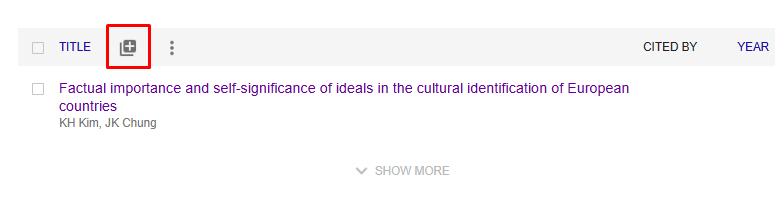
1. In your profile, select the "Add articles" button as shown in the screenshot below.
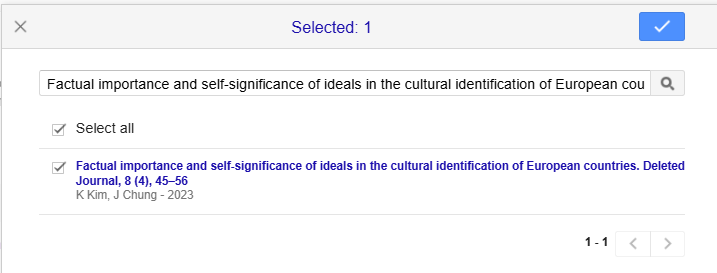
2. Type the title of the article in citation format into the search box. In this case: "Factual importance and self-significance of ideals in the cultural identification of European countries. Deleted Journal, 8 (4), 45-56". Select the article by checking the box next to the title. This will allow you to link another version of the article to your profile to further update the citation count of the main article.
Step 3. Merge entries
Select both article records (active publication link and citations without an active link). Follow the steps below:
- check the boxes to the left of the records you want to merge
- click the Merge button in the top menu.
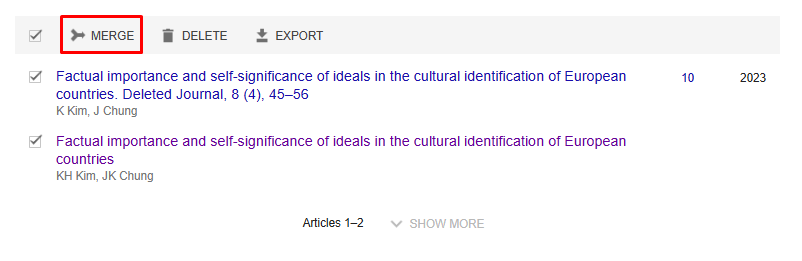
This action will merge the records into one, ensuring that citations are correctly linked to the main record of the article. As a result, the citation statistics in the profile will be updated according to the current data.
Step 4. Determining the correct version of the article
After selecting both article entries, you need to:
- define the correct version of the article
- press the button to merge ("Merge").
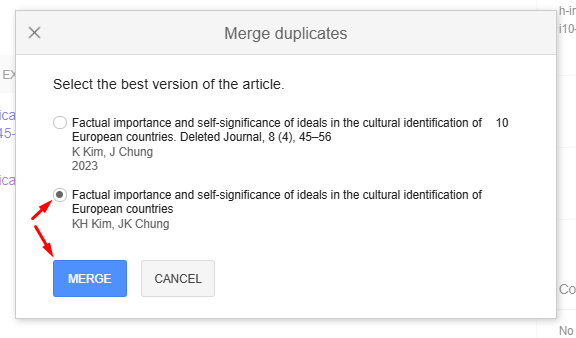
This action will combine citations and other results into a single article, ensuring that the total number of citations is displayed correctly and improving your profile on the platform.
Step 5. Check the results in the author's profile
Having performed the above steps, you will get one unified article with active links to the publication and correct display of the number of citations (in this case - 10). This will provide an accurate display of the impact of your work, allow you to conveniently track citations and correctly calculate your Hirsch index.
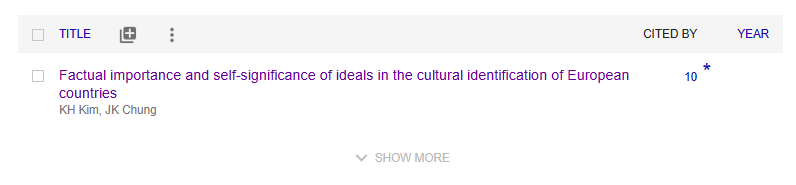
For your Google Scholar account to display data correctly, we recommend that you check your author profile regularly. This way, you can keep your Google Scholar profile current and accurate, which will help you better track your scholarly productivity and open up more career opportunities.
Your Google Scholar profile is a reflection of your professional success. If you need to improve your profile in the Google Scholar database, our experts will help you to ensure correct citation layout in accordance with journal requirements, customize technical aspects and increase your Hirsch index organically. You get a Google Scholar profile audit as a gift! Leave your contact details in the form below to get a detailed consultation from our expert.